

Written by Frederik Mogensen, member of our storage team who led the development of the Bucket-Gateway infrastructure.

Blob storage (S3, GCS, etc) is an amazing technology that is the gold standard for large scale data storage. Modern Machine Learning is hard for us to imagine without blob storage feeding the data into GPU fleets. We are heavily reliant on blob storage.
We moved all our blob storage onto Azure Blob Storage (see first post about Cloudless Blob), and observed that our scale exceeded what Azure could provide out of the box. This post focuses on the technology that enabled us to scale past Azure’s bottlenecks.

Hitting the limits of Azure
After moving our data analytics stack to Azure it became clear that Azure Blob Storage was not nearly as elastic and auto-scaling as our previous cloud provider. We started hitting the throughput limits on data in and out of our buckets as well as limits on the number of reads and writes per second.
Our initial design
First we will take a short look at our initial design for Blob Storage on Azure. When building on Azure Blob Storage, there are inherent scaling limitations and quotas that can impact performance and growth. Here are the most important limits we had to consider:
1. Request Throughput per Storage Account
Default QPS (Requests per Second): between
20,000and40,000 requests/secdepending on the region
2. Bandwidth Limits per Storage Account
Maximum Ingress (Data In to Blob):
60 Gbps (~7.5 GB/sec)Maximum Egress (Data Out of Blob):
200 Gbps (~25 GB/sec)
3. Storage Capacity per Storage Account
Maximum Data Stored:
5 PiB (Pebibytes)
4. Number of Storage Accounts
Maximum Storage Accounts per Subscription: 200 accounts
As many of the limits are on Storage Accounts, we initially provisioned a handful of those, and spread the buckets we were migrating across them as fairly as possible. But, we started experiencing noisy neighbours on our Blob Storage Accounts. One example of this was an incident where writes and reads on a single Iceberg table saturated the limits for an entire Storage Account.
Analytics batch jobs broke our frontends
A large SQL job in Trino, loading many different parquet files from an analytics bucket would use all our bandwidth, and Azure would throttle all buckets on the same Storage Account. Resulting in frontends that did not load as the requests for HTML and JavaScript files were getting dropped by Azure.
Unreliable Storage Accounts
In general Azure Blob Storage SLAs looks like this
Read requests SLA
99.9%: For Locally-Redundant Storage (LRS), Zone-Redundant Storage (ZRS), and Geo-Redundant Storage (GRS), and for RA-GRS if retries aren’t used.
Write requests SLA
99.9%: For all standard redundancy options (LRS, ZRS, GRS, and RA-GRS).
This meant we often had failing requests towards Azure Blob Storage. Having to live with the risk of incurring up to 45 minutes of unavailability every month was completely unacceptable to us.
Latencies
We identified the latencies for the ListObjects operation as a significant area of concern. This particular operation has notably poor performance both in average and at the 99th percentile. This mainly impacted the overall reliability and user experience of our analytics stack. The high latencies often lead to cascading issues, including timeouts, degraded user interface responsiveness.
Cost
We pay a lot for Head and List requests because we make a lot of Head and List requests, and we would like this to be cheaper!
Designing a scalable solution
Ask Azure to scale more horizontally?
The initial solution we explored to help fix scaling problems was aimed at Azure. Asking for higher limits, and trying to understand why the infrastructure did not scale the same way as we were used to and hoped for.
This attempt worked a bit, and we got a few of the limits raised temporarily. But in the end we had to accept the fact that the cloud was not magical and in fact just someone else’s computer. With the temporary bump in limits to stop the bleeding we started looking at which possibilities we could find to solve our scaling challenges ourselves.
Just use less blob storage?
Another straightforward solution was to just use less blob storage. Ask our stakeholders to do less requests per second, store less data, and read/write fewer bytes. This solution is clearly the cheapest one, less usage of blob storage means less money spent on blob storage. At least as long as no one decides to store the data anywhere else instead. Unfortunately, during high rate limit periods we saw multiple proposals to move use cases from the cheap blob storage to much more expensive tech, such as SSDs, Redis Key-Value databases, or CockroachDB clusters.
Create a new scalable infrastructure on top of Azure Blob Storage?
We could not really provision a single Storage Account per bucket, as we have many more buckets that the Azure limit of 200 Storage Accounts allows. Even if we could just allocate a new Storage Account per bucket, this would not solve the throughput or storage limit problems for our analytics buckets. It would also not help with the low SLA on Storage Accounts.
Implement a logical sharding of our buckets
We ended up proposing a transparent sharding layer on top of Azure Blob Storage. Spreading blobs from different buckets across many Storage Accounts. This approach would:
Remove the QPS limit for a single Storage Account (
20k-40K requests/sec) by sharding requests across multiple Storage AccountsRemove the throughput limit for a single Storage Account (
60-200 Gbps) by sharding reads and writes across multiple Storage AccountsRemove the size limit for a single Storage Account (
5 PiB) by sharding data across multiple Storage Accounts
This approach included a new inhouse Metadata Layer to keep track of which blobs were stored on which Azure Storage Accounts. Using this Metadata Layer resulted in:
Being able to respond to HeadObject and ListObject requests without having to query Azure Blob.
Making both request types much cheaper.
Making ListObjects much faster.
Being able to store multiple replicas of the same blob, consistently, on multiple Storage Accounts, in different regions.
Removing the reliability problems we saw with single Storage Accounts.
As crazy as it sounds, we propose to implement a more scalable blob storage on top of a less scalable blob storage.
Architecture and Metadata
To address the scaling and cost issues, we added the option for any bucket to use a simple metadata storage layer. This layer keeps track of which blobs are stored on which Storage Accounts and what the current version, size, eTag, and custom metadata is. Whenever someone downloads an object or lists blobs in the bucket, the Bucket-Gateway checks the metadata database first. If possible, it answers right away - without needing to call Azure at all for HeadObject and ListObject operations, as well as for non-existing blobs. This is a huge improvement, since these types of requests are frequent and expensive.
For storing data, we shard blobs across multiple Storage Accounts—spreading the load and sidestepping Azure’s limits on requests, capacity, and bandwidth. The Metadata Layer records these assignments, which makes it easy to add new Storage Accounts when existing Storage Accounts are getting close to the quotas, and helps minimize disruption when any given account is slow or unavailable.
Read flow
When reading blobs from buckets that are using the sharding Metadata Layer the Bucket Gateway follows the following steps:
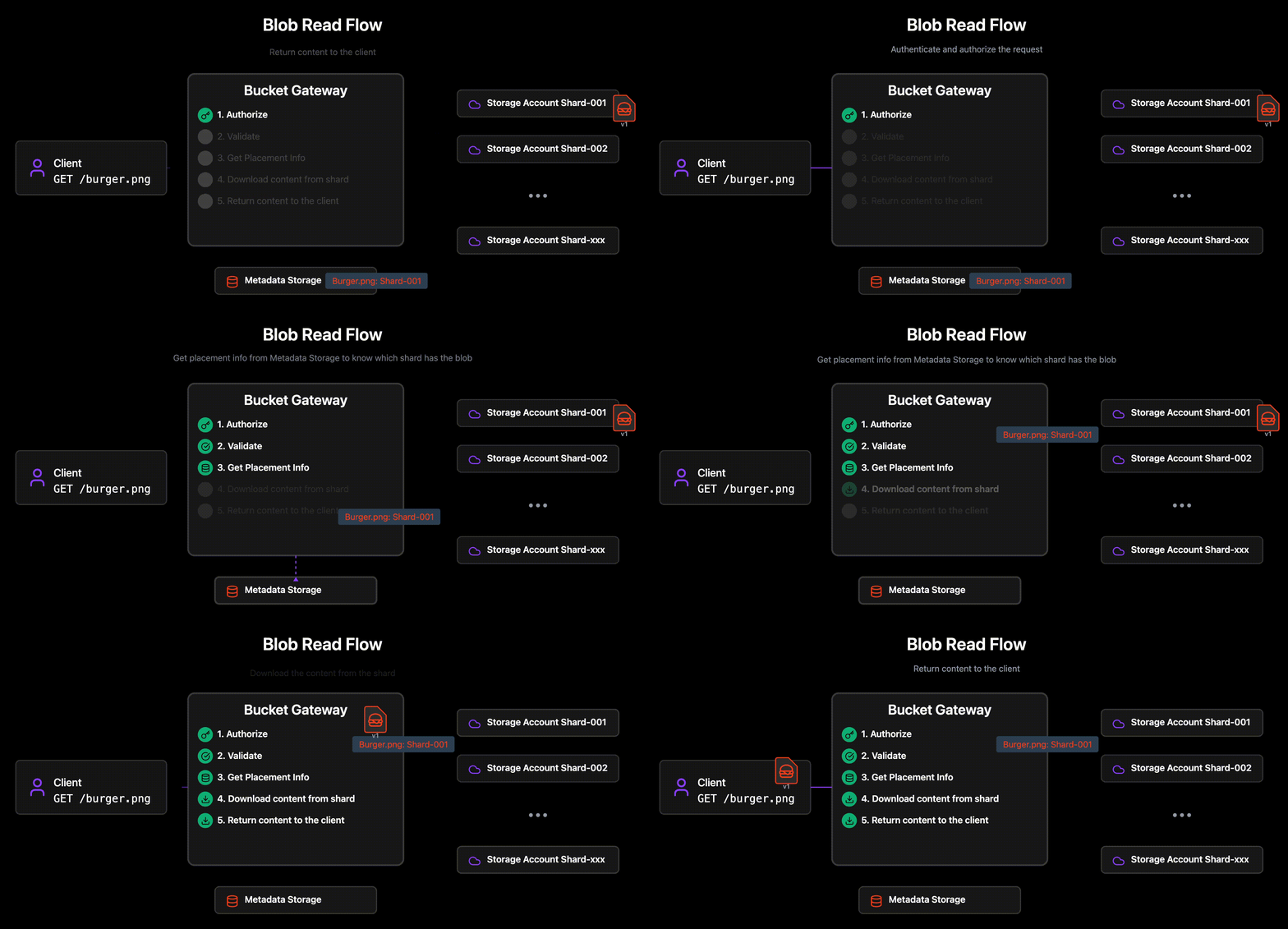
Authorizes the request
Can the given user read the requested blob in the bucket?
Looks up where the blob lives
The metadata for any given blob is stored in the Metadata Storage Layer.
The actual blobs may be stored in any region, and Storage Account.
If the blob is found in the Metadata Layer, the Bucket Gateway reads the actual blob content from the identified Storage Account and versioned blob name.
Write Flow
The write flow is a bit more involved. The process detailed below will ensure that the blobs are written atomically.
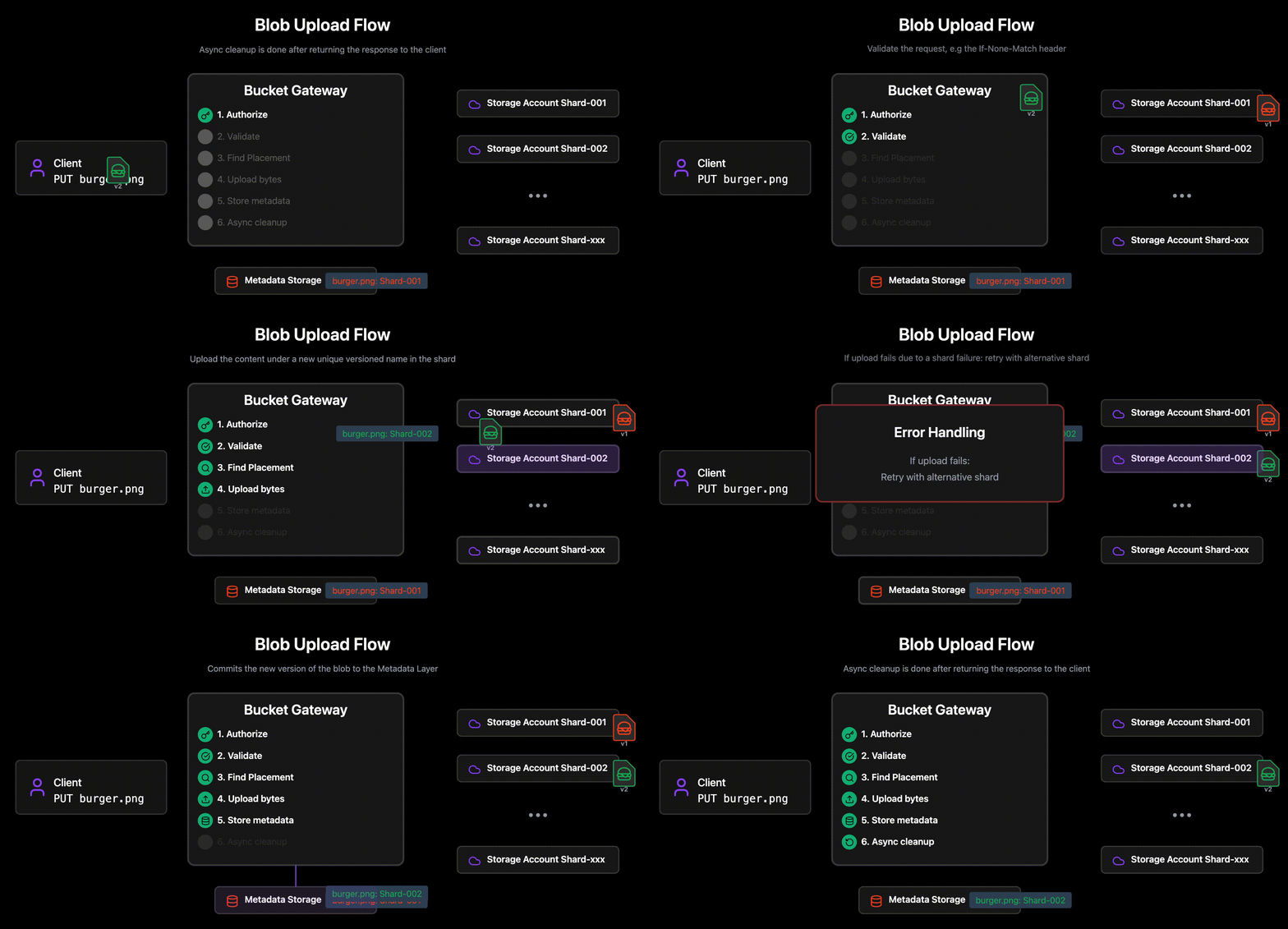
Authorizes the request
Can the given user write the requested blob in the bucket?
Validate the request is valid with the current metadata.
E.g the If-None-Match header, that requires that the blob does not already exist.
Use the Placement Algorithm detailed below to find the target Storage Account Shard for the new/updated blob content
Upload the content under a new unique versioned name in the shard.
If the upload fails, due to a problem with the Storage Account (rate limiting, throughput limiting, unavailability etc), use the Placement Algorithm again to choose an alternative Storage Account and retry.
Commits the new version of the blob to the Metadata Layer with the new backing location, size, Custom S3 Metadata etc.
If any step fails, we can safely return an error to the client without risking any externally visible inconsistency.
Any uploaded content that fails to be added to the metadata store will be cleaned up asynchronously
Async cleanup of old versions
Placement algorithm
The algorithm used to assign a blob to one of the many shared Storage Accounts is fairly simple.
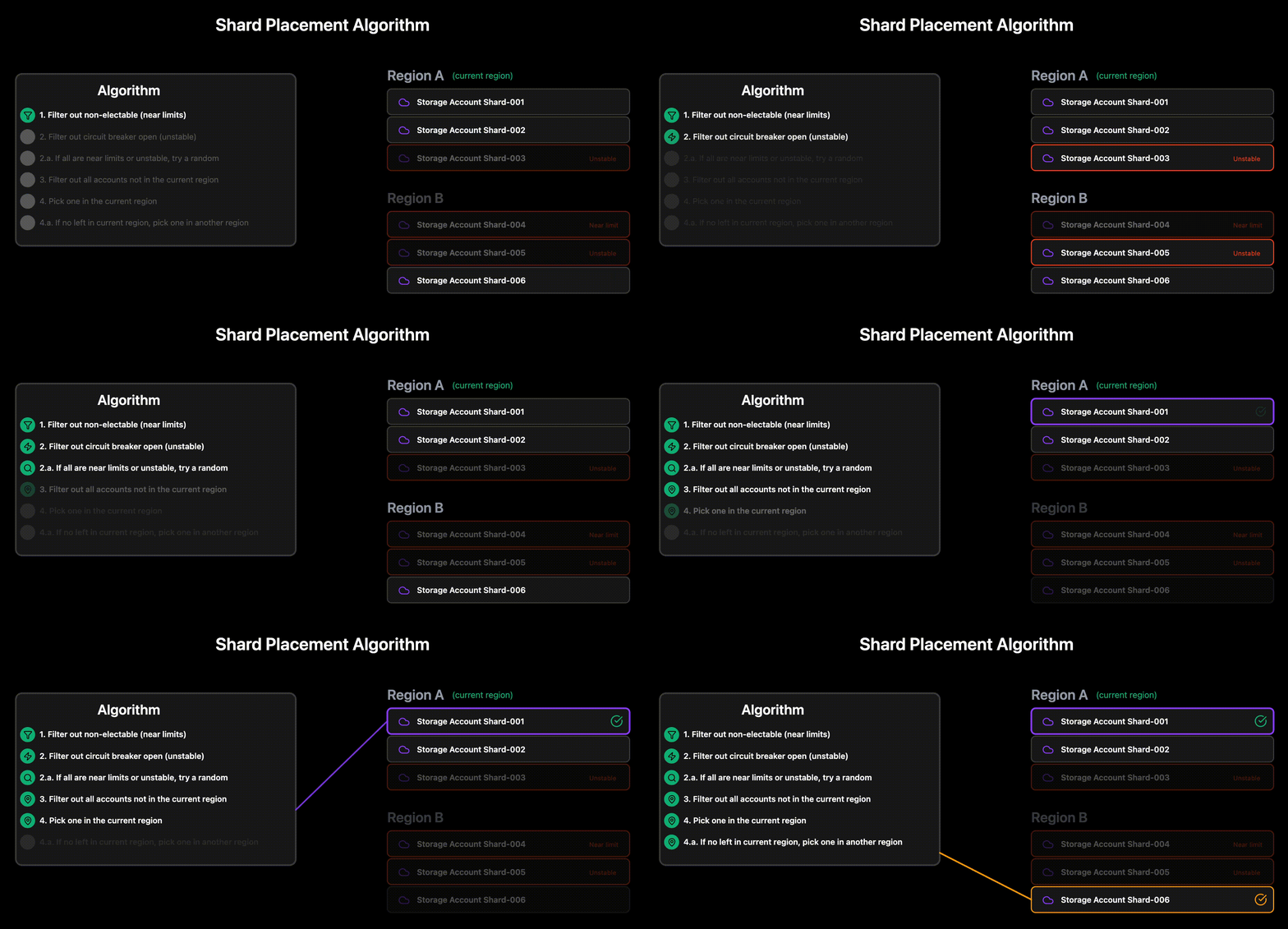
From all Storage Accounts. filter out all that are:
Not marked as electable for new blobs (accounts that are too close to different limits)
Marked by the circuit breaker as currently un-stable (has had multiple failed read/writes within the last 5 minutes)
If all circuit breaker as open, we pick a random to try anyway
We are now left with all accounts that will work. We choose the destination by
Picking a random account in the current region, if one exists
Picking any random account
This approach ensures that we shard blobs fairly across all active Storage Accounts.
Scaling process
When a single Storage Account gets close to full utilization, it’s removed from the set of electable accounts. When the current set of electable accounts gets too small, a handful of new ones are added. The Placement Algorithm will ensure that new blobs only land on accounts with free capacity.
The results
- Speed, Money, and Fame
Sharding
Looking back at the initial four pain points the Metadata Layer has improved our blob storage on all dimensions. The Metadata Layer has helped us scale beyond Azure’s built-in limits, slash costs for common operations, and keep our system responsive for users.
Scaling and Reliability
Scaling and reliability has improved for both reads and writes.
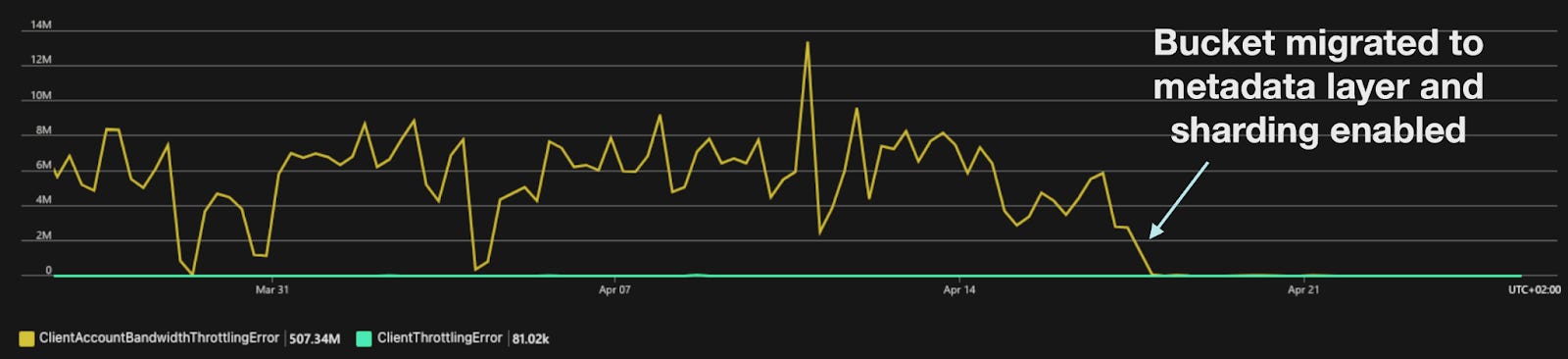
The main problems with hot buckets hitting the Storage Accounts limits are gone because of the new sharding strategy the Bucket Gateway uses to shard buckets across many Storage Accounts. Failed writes are much less frequent due to the Bucket Gateway being able to retry writes on alternative Storage Accounts when the initial one is degraded, and failed reads are gone as Azure no longer has to throttle the Accounts.
Latencies
Allows Bucket-Gateway to answer all Head and List requests without querying Azure Blob Storage.
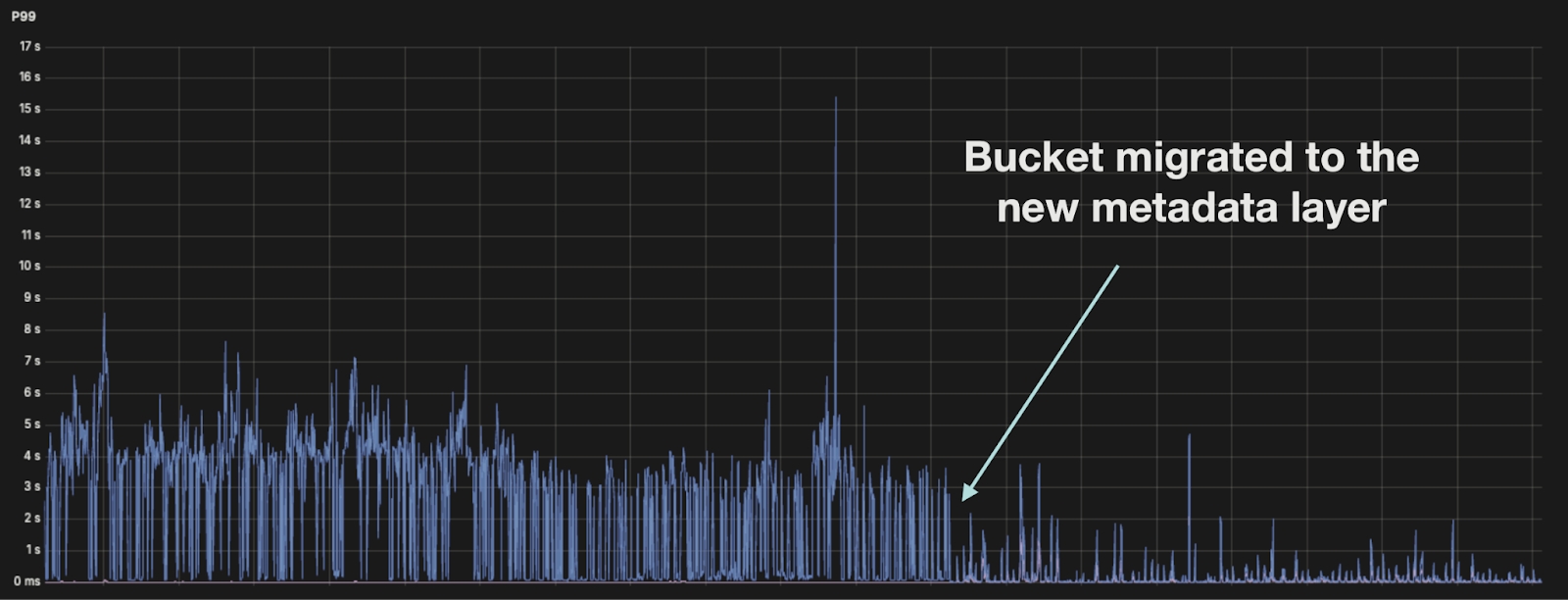
Cost
Keeping all metadata in-house allows Bucket-Gateway to answer all Head and List requests without querying Azure Blob Storage.

The Metadata Layer with versioned blob names also allows us to implement a consistent in-cluster cache to read from. But that’s for another blog post.
Cover photo by https://unsplash.com/@frankiefoto